Walk Up Songs app icon

What's New

Release notes for every version of Walk Up Songs, newest first.

1.7.0

October 16, 2026

Latest

Ready for iPhone Duo

Walk Up Songs is fully compatible with iPhone Duo on day one, and offers some useful layouts for Duo's unique poses.

Version 1.7.0 is built for iPhone Duo, so the app fills both displays edge to edge.
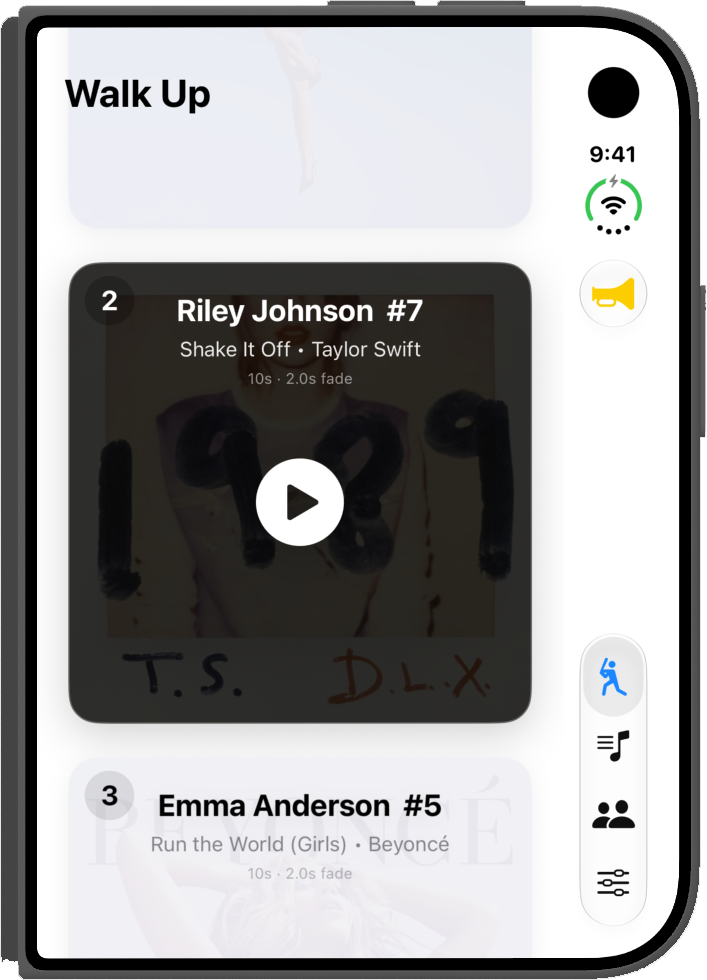
Walk Up Songs on a folded iPhone Duo, with the tabs along the right side of the outer display
Outer display
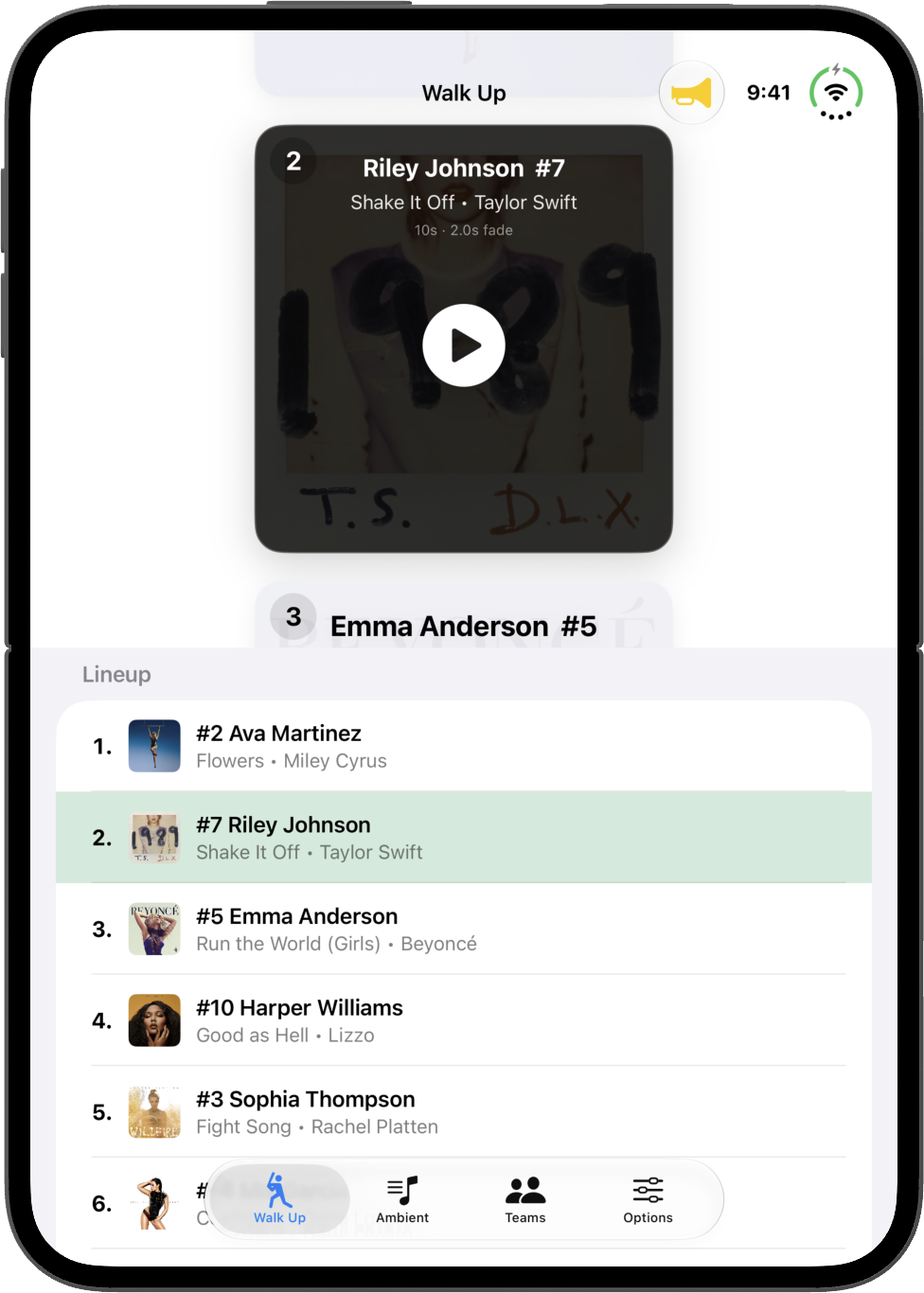
Walk Up Songs on an open iPhone Duo, with the player card above the lineup on the inner display
Inner display
  • Inner display: the Walk Up screen shows your player cards alongside the full lineup. The batter up is highlighted in your team color, and tapping any player jumps straight to their card.
  • Fold aware: the layout follows the fold, so cards stay clear of the crease whether Duo is open like a book or propped up like a laptop.
  • Outer display: Walk Up works just like it does on iPhone, with the tabs moved to the side of the screen.
  • Ambient: with Duo open like a book, the floating player moves off the fold so its play button never lands on the crease.

iPhone Duo support was built ahead of launch on Apple's iPhone Duo simulator. Like every Walk Up Songs feature, it gets its real test on game day once the hardware is out.

1.6.1

September 14, 2026

Ambient Playlists

Ready for iOS 27! To celebrate the release of this year's new OS, Walk Up Songs includes a fun and useful update to the Ambient tab. Ambient now features the ability to create Playlists! Keep all of your Warm Up songs, Pre-Game and Post-Game, and Practice tunes organized together in separate lists...with continuous playback! You can set your playlists to shuffle, loop or repeat...and manage the Up Next queue.

1.6.0

September 7, 2026

A new player screen and faster setup

Walk Up Songs 1.6 is a big update to a bunch of familiar sections of the app, streamlining the user interface wherever possible.

  • A new player screen brings songs, cue points, and announcer together in one place.
  • Roster and lineup setup is faster, with sorting, Add All, and fewer taps to get game-ready.
  • Two new announcer voices, Baseball Announcer and Softball Announcer, join the lineup.
  • Cleaner, tighter announcer clips and a simpler way to generate them.
  • Song search now clearly labels CLEAN and EXPLICIT tracks, making it easier to find the game-appropriate versions.
  • Plus dozens of refinements throughout the app.

Wishing you all a great Fall 2026 season!

1.5.2 and 1.5.3

April 28 to 29, 2026

Multiple intro songs, a new Cue Editor and per-song fades

  • Improved Team Introduction feature with support for multiple intro songs to switch on-the-fly.
  • Improved Team Sharing feature with support for resolving Music Library selections to Apple Music for better compatibility when sharing with another user.
  • Updated the Cue Editor with a new and improved user interface.
  • Added per player / per song custom playback and fade out durations! Can be used to override the team defaults for specific songs.
  • Added Cue Points for Ambient Playlist tracks! Long-press an ambient song to access the cue editor.
  • Team Intro now pulls songs from Ambient Playlist directly, including the new cue points.
  • General UI polish and bug fixes.
1.5.0 and 1.5.1

April 15 to 16, 2026

Team Introductions

  • Team Introductions: Add a custom announcement + walk-out song combo for when your team takes the field for the first time during a game!
    • Choose from a variety of popular AI-generated phrases, or create your own.
    • Handled directly inside the Ambient tab where you manage all of your warm up music.
  • Added Search bar to Ambient Playlist.
  • Added collapsible mini-player to Ambient Playlist.
  • Added new phrases to choose from when generating player's announcer clip, including a fun Randomize option!
  • Improved Roster UI.
  • Improved Walk Up card UI.
  • Tightened the gap between announcer clip and walk-up song; song will now start as the announcer clip is ending.
  • Hid system volume overlay and added a minimal custom volume indicator.
  • Various bug fixes and improvements.
1.4.0

April 6, 2026

Team Sharing

  • Team Sharing: Share a Team that you have built and configured with another user of the app! Simply select "Share Team" and your entire roster, lineup, songs, announcer clips, and cue points can be shared as single file via AirDrop, Messages, or Mail! AirDrop is recommended for in-person sharing.
  • Updated UI: Teams is now its own tab on the nav bar, making it easier to access the most important parts of the app.
  • Improved iCloud backup with new per-device backups and manual restore options.
1.3.1

March 24, 2026

Performance

Performance enhancements.

1.3

March 22, 2026

Multiple announcer clips

Enhancements to Announcer feature, making it easier to store multiple announcer clips and switch between them.

1.2

March 11, 2026

Announcer overhaul

Announcer overhaul and multiple audio fixes.